ZELLE, Cash,
Bank/Wire Transfers, Money Orders.
A 5% discount is available for all
sales paid using Zelle, cash or money orders.
Contact me with any questions.
ZELLE: https://www.zellepay.com/.
Most
banks (and most mobile banking apps) are now
offering Zelle.
Zelle offers a simple and secure way to make or receive a
payment to or from anyone with an email
address or mobile phone number.
Similar to Paypal, except so far they charge
NO fees.
To send a
payment through Zelle for an order purchase
at Dave's Volvo Page, you need to enroll in
Zelle first, which can usually be done
through your banking app or online
account. Then you may send a payment
using my email address as the recipient: dbarton [at]
linkline [dot] com.
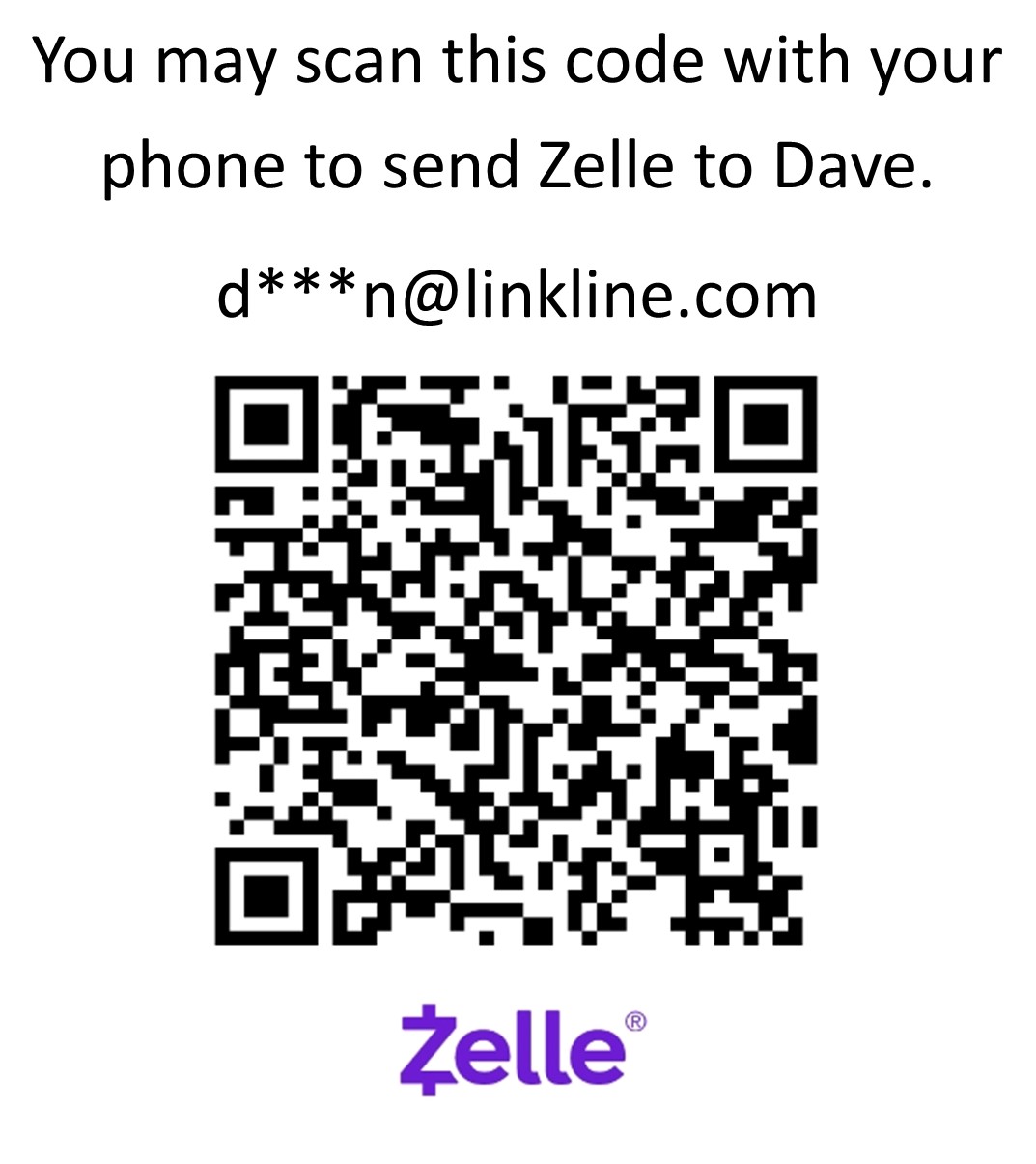
Here's a QR code from Zelle that should streamline a payment to me:
INTERNATIONAL WIRE
or INTERNATIONAL BANK TRANSFERS:
Wire transfers are accepted for payment sent
in USD.
Keep in mind that my bank charges a $15.00
fee for me to receive a bank transfer.
You will need to add this $15.00 fee to your
payment. Using this method usually only makes sense if the order is for a large amount.
If the order amount is $300 or more, I will pay the transfer fee.
It can take about 5-7 days
for a wire transfer payment to be completed.
Email me
for account details.
CASH:
Cash is accepted,
however there may be a risk in sending
cash in the mail. I'll leave the
choice to you.
MONEY
ORDER:
A money order may be used. The U.S. Post Office
offers money orders as does Walmart and other stores.
|
STEP BY STEP ORDERING
INSTRUCTIONS
Fundamental
Ordering 101: For those of you
who don't get along well with computers or are
confused by these pages, here are detailed instructions
for ordering just about anything here.
Step
1: Find an item you want to order.
Step 2: Enter order quantity,
choose item (and any options if there are any)
and click 'Add to
Cart.'
Step 3: When
done shopping, find a link that says: When done shopping, proceed to
shipping: CLICK HERE'. Click
the 'CLICK
HERE.'
Step 4: Look
over the SHIPPING options and choose one. If you don't live in the U.S., please choose INTERNATIONAL shipping. Then
click 'Add to
Cart.' If you need an option that is not shown,
please email me: CONTACT
Step
5: If you're ready to Check Out, find and click 'View Cart' (this is usually near the shipping options). You can always come
back to my page if you decide to continue shopping.
Step
6: You are now
in your shopping
cart. If you change your mind and
want to continue shopping, click 'Continue Shopping.' If
you're ready to check out, click 'Check Out Now.'
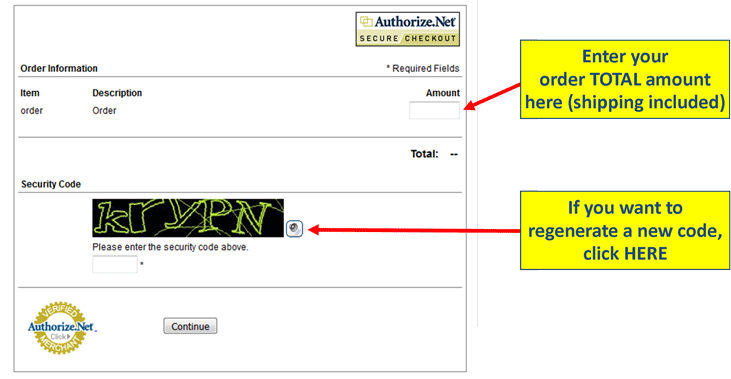
Step 7: Fill in the 'Billing' and 'Shipping' address boxes. The boxes with a RED Asterisk are required to proceed with the order.
Step 8: Check the box for the 'Payment Method' that you
prefer. If you're not sure, you can
scroll up on THIS PAGE to read about different
payment methods.
Step 9: There is a 'Comments' text box at the bottom in case there for anything you might want to say or
add for special instructions. Anything
can go there. Or leave it blank.
Step 10: Complete your payment info and click 'Continue Check Out.'
Step 11: Your order has been
completed. You'll
get an email showing you that I have
received your order and payment and it will
be sent soon. All orders use automatic package
tracking and that information will be
automatically sent to your email when the
mailing label is printed.
Thank you. CONTACT
|
SHIPPING INFORMATION and POLICIES
For any order, only ONE shipping charge
is needed. For convenience, you'll find shipping menus with different
shipping options on every page where product is offered for sale. Most often it's at the bottom of the page.
Mail to destinations in USA:
Most items are shipped using USPS First Class Mail (because it's the most economical) or
sometimes USPS Priority Mail (if the customer
chooses it). Small items, such as stickers, horn buttons and
sometimes relays, are most often sent by First Class Mail because it's simple and inexpensive. Priority Mail
is usually faster than First Class, but more expensive.
TRACKING:
All orders are shipped using the USPS.com tracking
service. The tracking number is
automatically sent to your email for all USPS parcels
sent in the USA and International locations.
If you did cannot find your tracking number,
email me any time and I'll forward it to you.
EXPRESS MAIL
SHIPPING:
For the FASTEST service, almost any order can be
shipped using USPS Priority Mail Express (Express Mail). Express Mail typically has a
faster delivery time than other services, however it is much more expensive. All
of my shipments get picked up daily at my
location by the USPS. Sometimes this pick up
happens in the morning and sometimes in the
afternoon. Sometimes Express Mail packages get
back to the post office late. I can't control
that, so for that reason I cannot guarantee one
day shipping if the USPS web site quotes it as
so. If my site doesn't show Express Mail as an
option for your items, I can give you an
Express Mail price quote if you email me and
send me your ZIP Code.
UPS is used on occasion, usually for special requests. This is usually more expensive. Please email for more info.
INTERNATIONAL SHIPPING:
For any order, only ONE shipping charge
is needed. For convenience, you'll find shipping menus with different
shipping options on every page where product is offered for sale.
I ship
to almost every country in the world.
Most
international shipments are sent using USPS
First Class Mail International, USPS First
Class PACKAGE International or USPS Priority Mail International.
Smaller items or those that fit in a small
envelope (such as stickers) are usually sent
by First
Class Mail International. This is the
slowest service available and it is almost
always slower than other choices (although less expensive).
UPS is used on occasion, usually for special requests. This is usually more expensive. Please email for more info.
INTERNATIONAL
PACKAGE TRACKING:
All
orders
using USPS and GlobalPost parcels (this means all
envelopes or boxes from me) are shipped
using tracking. The tracking number
is emailed automatically to your email
address when the mailing label is printed.
If you cannot find your email notification,
email me and
I'll forward it to you. USPS and GlobalPost
tracking can be used for all countries who cooperate with the U.S..
Not all countries do this.
Here is a list of cooperating countries that are SUPPOSED be scanning
U.S. packages when they arrive in your country (MANY of THESE still DO
NOT SCAN even though they are required to): Australia,
Austria, Belgium, Brazil, Canada, Croatia, Cyprus, Denmark, Estonia,
Finland, France, Germany, Gibraltar, Great Britain and Northern Ireland,
Greece, Hong Kong, Hungary, Iceland, Israel, Italy, Japan, Latvia,
Lebanon, Lithuania, Luxembourg, Malaysia, Malta, Mexico, Netherlands,
New Zealand, Norway, Poland, Portugal, Republic of Serbia, Saudi Arabia, Singapore, Slovak Republic (Slovakia), Slovenia, Spain,
Switzerland, Thailand, Turkey.
TRACKING QUESTIONS:
Tracking works pretty
well for any package while still in the USA,
but I have found it will not work very well after leaving the
USA or in many other countries. Some
countries will show very little information,
such as acceptance by or departure from
Customs and then final delivery. This is
because some customs offices or post offices are often FAILING to SCAN the mail.
| SHIPPING DELAYS for International Mail: |
Please Read THIS if your international package is delayed:
In a perfect world,
the CUSTOMS OFFICE
or POST OFFICE in your country will receive and scan a package from the U.S. when it
arrives and then you will know if it's making progress. I find that MANY, MANY countries are FAILING TO SCAN packages
when they arrive. Often a first scan in the recipient country is delayed.
Some packages even get delivered without EVER being scanned in your country. This is a problem with many post offices in Canada, Europe and Australia.
Thank you, Dave
|
Questions about High Costs for International Shipping.
I get some questions why expensive international shipping is required,
when I could send a small order in a plain envelope with some
stamps. I used to do this for international mail, but I discovered there are MANY impatient and dishonest people
who demand tracking. If there is no tracking, they claim the order
never arrived and they demand a refund. So I learned an expensive lesson
and now ALL international orders require tracking and insurance.
| CUSTOMS
DUTY, IMPORT TAXES OR VALUE FEES: |
I get questions
about import fees from many countries:
Customs
fees, duty, taxes or other fees assessed by
your country for an item CANNOT be paid for
you in advance by me when using USPS Mail. I know that
Fedex offers this option, but USPS does not. For USPS
Mail, you are the only one who can pay customs
fees when the package arrives.
Any mail item entering a foreign country might
be subject to customs inspection and
assessment of duty, taxes, and fees in
accordance with the laws of that country.
Customs duty and taxes are assessed
generally if the item sent is a dutiable item (most commercial sales) and if
the value of the item is above the threshold
set by the customs in your country. Each country
assesses their own customs, duties, and taxes.
Your country probably has a website for
Customs Service information.
Customer
comment regarding Denmark:
All packages and shipments
originating from outside Denmark with a
value of $17 USD or more will be
delayed/cleared through Customs and
taxes may be imposed.
The
actual import tax in Denmark is not
high, but the delivery company has a
tax handling fee of approximately
$30 USD.
Customer comment regarding EU:
All packages and shipments
originating from outside EU with a value
of 22€ or more will be delayed/cleared
through Customs and taxes may be imposed.
A value of
about $25 USD or less may avoid this.
| According
to
https://www.gov.uk/eu-eea,
EU countries are: Austria,
Belgium, Bulgaria, Croatia,
Republic of Cyprus, Czech
Republic, Denmark, Estonia,
Finland, France, Germany, Greece,
Hungary, Ireland, Italy, Latvia,
Lithuania, Luxembourg, Malta,
Netherlands, Poland, Portugal,
Romania, Slovakia, Slovenia,
Spain, Sweden. |
Customer
comment regarding Norway:
Before April 2020 all purchases
under 350NOK (approx $39 USD) were tax-free when entering Norway.
After April 2020 is is reported that ALL items entering customs will be
charged with 25% value tax and also a potential extra handling fee.
Customer Comment regarding UK:
It appears that
packages originating from outside UK or EU
with a value of more than £15 (or £39 for a
gift) will be imposed
a fee. This fee can begin at $15.50 USD.
Duty Fees for CANADIAN Customers
The Canada Border
Services Agency (CBSA) may charge an import duty on
any item with a value over $20 (CAD) including postage, plus up to a $9.95 surcharge.
USPS
First Class Mail International or USPS
Priority Mail International are the best
options for shipping to Canada.
UPS (United Parcel Service) may be faster in
some instances, but it has been reported that
the brokerage/handling fees
they charge for collecting import duties can
be very high. It can really shock you! I
have been told that if an item is shipped by UPS to Canada, the UPS
brokerage/handling fee can be as high as
$35.00, even for a very small item.
Information on CBSA Tariff Item 9966.00.00 (for parts intended for 25+ year old cars).
https://www.cbsa-asfc.gc.ca/publications/dm-md/d10/d10-15-20-eng.html
HS
Code 9966.00.00 provides for the DUTY-FREE importation to Canada of vehicles or components which
are intended for 25 year
old or older vehicles. If you're buying a part that qualifies, I'll be happy to add
HS Code 9966.00.00 to the customs label.
There is some more info here from a member of the Triumph club: https://tr6.danielsonfamily.org/CanadaBrokerageFess.htm
PRE-PAID DUTY PROGRAM for SHIPPING to CANADA
|
Beginning in 2020, USPS began a new option for shipments to Canada.
This program applies to USPS First Class International Packages only.
This new
program allows the SHIPPER (me) to PRE-PAY a flat-rate Customs Fee of
$9.95 (USD), which will cover all Canadian Duties and Taxes for your
package. As a result your First Class Package International Package is
delivered directly to your door without any Customs delay or any fees
due upon delivery. This flat rate fee covers all taxes free and clear
including duties and value added taxes (VAT).
Maximum package value for Canada $150.00 USD
Package weight for this program is limited to 4 lbs. (1.8 kg).
Please email if you think your order might be close to the max weight. (CONTACT)
This option will be found in most Canada shipping options in shipping menus in Dave's Volvo Pages.
Feel free to share your feedback is on how this program performs on your end and if you find it to be a good value.
Thank you
|
| Declaring a Lower
Value for International
Shipments: |
If needed, I will honor your wish to
declare a lower value of the
purchase for Customs declaration, but you must ask.
A simple request
in the order check out comment box or by email
is OK. Do not place this
comment in a Paypal payment. I won't see it
there.
Please remember that if
an item is declared for less than the full
value, then it cannot be insured for the full
value. It can only be insured up to the
amount of value that is declared during
shipping.
IN THE
EVENT OF THE LOSS
OF AN INSURED ORDER:
If your order is lost (or you think it
might be), please first review the
USPS tracking information if you have it.
The
USPS.com
tracking service may be found here.
If you don't have your tracking number, please
email me and I will forward it to you.
Please
keep in mind that a replacement
for a lost or damaged order can
only be made if the order was
insured.
ALL INTERNATIONAL
ORDERS are TRACKED and INSURED
AUTOMATICALLY.
|
If
your
package becomes LOST, USPS
policies for insured packages
allow a loss claim to be made
NO SOONER than 30 days after
the date of shipment.
Since there are often extra delays involved with international
mail, please try to
understand and be patient.
|
Non-Insured Shipments
If you choose a shipping method for
your order that is not
insured, please remember that if your order
becomes lost or damaged, I CAN NOT BE
responsible to replace it.
All
international shipment are
AUTOMATICALLY INSURED.
It is very rare that mail is lost
with my orders (less
than 1%), but the possibility
exists.
Insuring a delivery is usually very little
extra. Please
email if you have any questions: CLICK
HERE.
SHIPPING
COUNTRY LIST:
Dave's Volvo Page ships all over the
world. Here is a list of countries we ship to.
Albania
|
Cayman Islands
|
Grenada
|
Monaco
|
St. Thomas
|
Algeria
|
Chile (see below)
|
Guam
|
Netherlands
|
Sweden
|
American Samoa
|
China
|
Guatamala
|
New Zealand
|
Switzerland
|
Angola
|
Columbia
|
Holland
|
Northern Ireland
|
Tahiti
|
Argentina (see below)
|
Costa Rica
|
Honduras
|
Norway
|
Taiwan
|
Armenia
|
Croatia
|
Hong Kong
|
Panama
|
Tanzania
|
Aruba
|
Cypress
|
Hungary
|
Paraguay
|
Thailand
|
Australia
|
Czech Republic
|
Iceland
|
Peru
|
The Netherlands
|
Austria
|
Denmark
|
India
|
Philippines
|
Turkey
|
Bahamas
|
Dominican Replublic
|
Indonesia
|
Poland
|
Ukraine
|
Bahrain
|
Ecuador
|
Ireland
|
Portugal
|
United Arab
Emirates
|
Bangladesh
|
Eqypt
|
Israel
|
Puerto Rico
|
United Kingdom
|
Barbados
|
El Salvador
|
Italy
|
Qatar
|
United States
|
Belarus
|
England
|
Jamaica
|
Republic of Georgia
|
Urugray |
Belgium
|
Estonia
|
Japan
|
Reunion
|
US Virgin Islands |
Belize
|
Fiji
|
Kenya
|
Romania
|
Wales |
Bermuda
|
Finland
|
Kuwait
|
|
|
Bolivia
|
France
|
Latvia
|
Saudi Arabia
|
|
Botswana
|
French Guiana
|
Lithuania
|
Scotland
|
|
Brazil
|
French Polynesia
|
Luxembourg
|
Singapore
|
|
British Virgin
Islands
|
Georgia
|
Malaysia
|
Slovakia
|
|
Brunei Darussalam
|
Germany
|
Marshall Islands
|
Slovenia
|
|
Bulgaria
|
Great Britain
|
Malta
|
South Africa
|
|
| Canada |
Greece
|
Mexico
|
South Korea
|
|
Canary Islands
|
Greenland
|
Moldova
|
Spain
|
|
We no longer ship
to Argentina or Chile.
The Argentina and Chile
postal services have been given many chances to deliver items sent by
me and it has proven to
be unreliable in EVERY
shipment. No order EVER reached its destination.
|
|
Refunds and Returns:
With the
exception of wire harnesses, relays, sensors,
voltage regulators or other electrical parts, I
will normally honor returns on almost
any item or part I sell, as long as it is
returned unused, undamaged,
uninstalled, and unaltered. The exception to all
this would be if the part was defective. I'll
take care of the problem if you get a defective
item (see below). Any other returns
may be considered on a case by case basis.
Most stickers can be returned or exchanged, EXCEPT for stickers that are CUSTOM PRINTED to
order and any stickers with custom MAGNETIC backing (which cannot be removed).
Custom gauge faces are also not returnable. Those are all made to order per your specifications.
Please email me if you have a question: CONTACT.
IN ALL CASES,
YOU SHOULD CONTACT ME FIRST ABOUT A
RETURN.
WIRE
HARNESS RETURNS
Any wire harness that has been installed or altered cannot be returned.
You should be certain of the wire harness
application before you order. Email me if you
need help. If you order the wrong part or
find out later that you no longer need a wire
harness you ordered, you must contact me first for approval
before any return. Returns for
errors not caused by me will likely result in a
Return Fee to help cover my labor costs and
finance fees. The
current Return Fee for any wire harness is 10%
plus any finance fees if any exist, such as
Paypal or credit card fees. For example, Paypal does not return initial charge fees (3.49% plus $0.49).
ELECTRICAL PART
RETURNS
Any part that has been installed or altered cannot be returned.
Try to be certain of the application before you
order. Email me if you need help. If you
order the wrong part or find out later that you
no longer need a part you ordered, you must contact me
first for approval before any return.
A return fee may be levied on a case by case
basis to cover my labor costs and finance fees.
The default
Return Fee for an electrical part is 20%.
DEFECTIVE
ITEMS
This is really
rare. Almost never happens. If you receive a
defective part, please email me right
away. Depending on what the item is, I may
ask you to return it to me so I can inspect or
test it. If a part was defective, I will
gladly replace it or accept a return.
SHIPPING
COSTS FOR RETURNS:
Unless the return is due to a defect or error on my part, the customer will be responsible for shipping costs to send an item back.
|
Privacy Policy:
Legal stuff. Nothing out
of the ordinary. Required by my credit
card processing company.
Thank you for visiting Dave's Volvo Page.
This privacy policy informs you how your
personal information is used in this site.
Please read this privacy policy before using
the site or submitting any personal
information. By using the site, you are
accepting the practices described in this
privacy policy. These practices may be
changed, but any changes will be posted.
Changes will only apply to activities and
information going forward, not retroactive.
You are encouraged to review the privacy
policy whenever you visit the site to make
sure that you understand how any personal
information you provide will be used.
Note: the privacy practices set forth in
this privacy policy are for Dave's Volvo
Pages, which include page within
davebarton.com, prancingmoose.com and
240turbo.com. If you link to other outside
web sites, please review privacy policies
posted at those sites.
Collection of Information:
Only when voluntarily submitted by our
visitors, this site collects personally
information, such as names, addresses,
email, etc. The information you
provide is used to fulfill your specific
requests (such as an inquiry or purchase).
This information is ONLY used to fulfill
your specific requests and is never provided
to others.
Cookie/Tracking Technology:
Portions of this site (shopping carts, etc.)
use cookie and tracking technology. Cookie
and tracking technology is useful in
gathering information, such as tracking the
numbers of visitors and understanding how
visitors use the site. Cookies can also help
customize the site for visitors and are used
to import selected purchases to help
generate a shopping cart. Personal
information is not collected using cookies
or other tracking technology, however, if
you previously provided personally
information, cookies may be tied to such
information.
Distribution of Information:
We may share information with governmental
agencies or other entities assisting us in
fraud prevention or criminal fraud
investigation. We will only do so when: (1)
required by law; and, (2) trying to protect
against or prevent actual or potential fraud
or unauthorized transactions; or, (3)
investigating fraud which has already taken
place. No information is ever provided to
outside entities for marketing or any other
purposes.
Commitment to Data Security:
Your personally information is kept secure.
Only authorized agents (who have agreed to
keep information secure and confidential)
may have access to this information.
Privacy Contact Information:
If you have any questions, concerns, or
comments about our privacy policy, you may
contact us using the email link shown above.
We reserve the right to make changes to this
policy. Any changes to this policy will be
posted.
|
Shopping Cart
Troubleshooting Info
Update: Oct 2, 2024. The FIREFOX FIX.
After fighting this problem for a long time, a
friend with some techie influence managed to get FIREFOX to add a bug fix just for this shopping cart issue. So if you've
been having cart issues as discussed here, you might try downloading or
updating to Firefox 131.0 (released Oct 1 2024) or later.
https://www.mozilla.org/en-US/firefox/131.0/releasenotes/
Firefox is available for PC, Android and IPhone or IPad.
Comments welcome: CONTACT
------
OR, if needed, you may just submit MORE THAN ONE order. If you do this, just add shipping to only ONE order.
If you send more than one order, please add a comment in the checkout comment box that you have more than one order.
--------
The previous fix that actually worked:
After this became untenable, I began using an OLDER version of Firefox from 2020 just for creating orders with long lists of items. And I do not ever upgrade it.
This seemed to work very well.
If this step interests you, here's an article from Mozilla: https://support.mozilla.org/en-US/kb/install-older-version-firefox
Here's a direct link to a directory of older Firefox versions: https://ftp.mozilla.org/pub/firefox/releases/
Scroll through the list to find a version you like. For example, Version 72 was released in January 2020 and works well. That's what I use.
After you click on the version number, you'll see a selection of versions for different available platforms. Click on one you want. The platform I use in win64/.
In the next list you can select the language you want. In my case, I selected en-US/ (for English-US).
Then you get presented with the exe file: i.e: Firefox Setup 72.0.exe (49M). Click it and save the exe file in a folder.
Then you can install by clicking that file in your folder.
AVAST SECURE BROWSER
UPDATE Feb 2023: I was recently informed by a customer that AVAST SECURE BROWSER seems to work much better with the problem of dropping shopping cart entries from Dave's Volvo Pages.
So
if you're experiencing these problems when adding items to the cart,
you might try downloading Avast. They offer a free browser as well as an
upgraded Avast Pro that is available for a subscription if you find it
that useful.
https://www.avast.com/lp-ppc-secure-browser
General Overview of the Problem.
Seems to be most problematic with Chrome, Edge or Safari:
PROBLEM SUMMARY
The problem is that only one item or only a few items
can be added to a cart. Some items are dropped from the cart when trying to check out.
New issues surfaced in 2020 due to security features added by Google CHROME, Microsoft EDGE, and SAFARI.
There is more info below, but in short, it's related to SameSite Secure Cookie Protocols or Cross-Site Security Protocols that are being added to newer browser versions.
If you are experiencing problems as described above when adding items to your cart, other browsers, such as INTERNET EXPLORER, FIREFOX and SAFARI (Apple) seem to be working
better for other customers. So if you cannot get Chrome or Edge to work, you can try another
browser.
Chief Symptom:
- The cart only allows a couple of items to be listed at any given time.
When a number of items are added, the cart will lose or drop the first items that were added.
Cause:
- Google and Microsoft have been adding security features to their
CHROME and EDGE browsers, which are causing these problems to occur.
These changes affect how cookies are stored on your computer or device.
Cookies are files that your browser collects from other sites, such as
mine, which allows your device to remember items placed in a shopping
cart.
So far, no solution on my end has been found, except to recommend using a browser OTHER THAN Chrome or Edge.
WHAT
ARE
COOKIES? A cookie is a small file created by a
web site (like my shipping cart) which stores bits of information
on your computer as you select things, such as when you click ADD TO CART. A Shopping Cart will function by
asking your computer to remember the things you select (these
are cookies). This way, your computer will be
able to remember the cart items you have
selected and they'll be listed correctly in your cart when you check out.
What is SameSite or Cross-Site: Web browser developers thought it would be a
good idea to provide tighter security for people browsing the
internet. A bad side effect is that it creates really stupid
problems for a lot of people using sites (like mine) which use shopping
carts hosted by a shopping cart company, which has a different web address than my site. When you click Add to Cart on my page (prancingmoose.com), a cookie gets transmitted from my hosted shopping cart provider (3dcartstores.com). The SameSite or Cross-Site protocols don't like this because the two dot-com sites are different, hence the name, "SameSite" or "Cross-Site"
Instead of allowing you to choose to adjust these settings, newer browser settings will simply
refuse to allow the shopping cart cookies to be used as they normally
would. This sometime results in parts of an order failing to appear in the shopping cart.
THERE HAVE BEEN SOME WAYS TO FIX THIS in SOME Versions.
Google Chrome (up to Version 90)
(For Version 91 and later CLICK HERE)
How to Disable SameSite Cookie Enforcement.
These setting changes may easily be reversed later if needed.
1. Copy and enter the following text into your browser search/address bar and press ENTER.
chrome://flags/#same-site-by-default-cookies
|
2. Find SameSite by default cookies and change the setting from Default to Disabled.

| 3. Click the Relaunch button at the bottom of the screen. |
|
4. Next copy and enter the following text into your browser search/address bar and press ENTER.
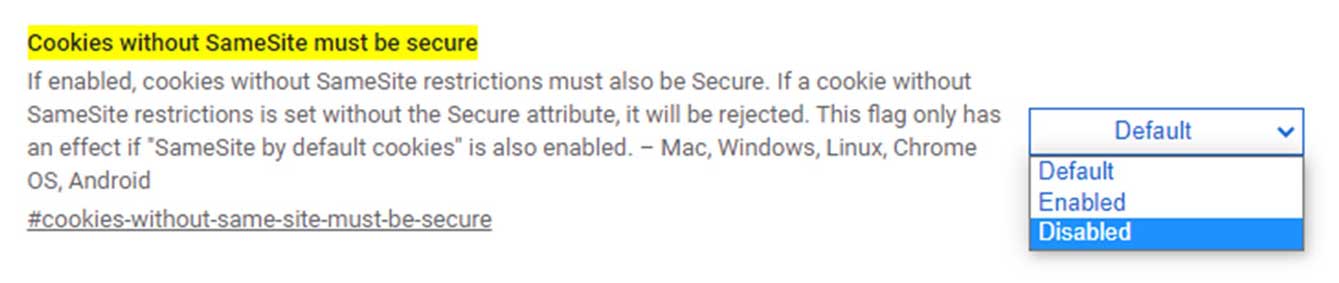
chrome://flags/#cookies-without-same-site-must-be-secure
|
5. Find Cookies without SameSite must be secure and change the setting from Default to Disabled.
| 3. Click the Relaunch button at the bottom of the screen. |
|
The changes will take affect immediately. If needed, you can reverse the changes by following the same steps and change back to Default.
Source: https://support.siteimprove.com/hc/en-gb/articles/360007364778-Turning-off-Google-Chrome-SameSite-Cookie-Enforcement
|
(2022 update note: In the latest versions Google has now removed the ability to edit cookie enforcement)
Google Chrome (Version 91 and later)
How to Disable SameSite Cookie Enforcement.
1. With CHROME CLOSED, find your CHROME desktop shortcut and right click.
Then click "Properties."
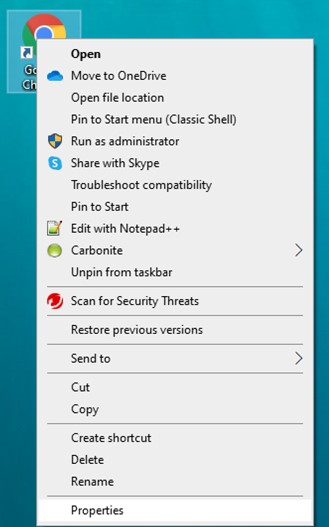
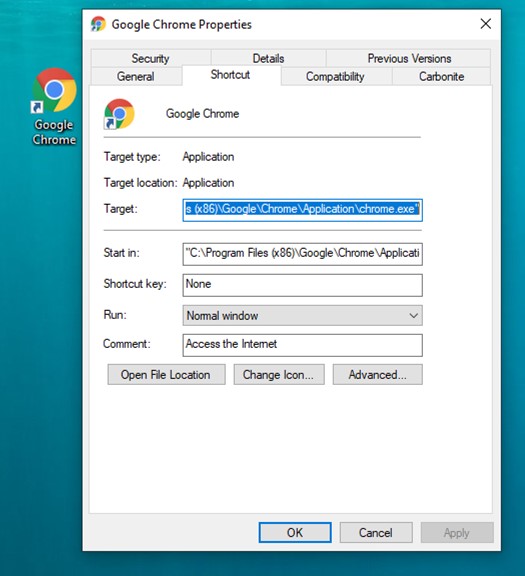
2. You'll see this Properties box below. Look at the Target window.
It will say: "C:\Program Files (x86)\Google\Chrome\Application\chrome.exe". You'll
be adding a command string to that window directly after the .exe" (put
one space between the two strings). You may copy the command string
text below and then paste it.
The command string is: –disable-features=SameSiteByDefaultCookies
|
This means that the Target window will say:
"C:\Program Files (x86)\Google\Chrome\Application\chrome.exe" –disable-features=SameSiteByDefaultCookies
Then click "OK".
Then start Chrome.
|
(2022 update note: In the latest versions Microsoft has now removed the ability to edit cookie enforcement)
Microsoft Edge
How to Disable SameSite Cookie Enforcement.
These setting changes may easily be reversed later if needed.
1. Copy and enter the following text into your browser search/address bar and press ENTER.
edge://flags/#same-site-by-default-cookies
|
2. Find SameSite by default cookies and change the setting from Default to Disabled.
| 3. Click the Relaunch button at the bottom of the screen. |
|
4. Next copy and enter the following text into your browser search/address bar and press ENTER.
edge://flags/#cookies-without-same-site-must-be-secure
|
5. Find Cookies without SameSite must be secure and change the setting from Default to Disabled.
| 3. Click the Relaunch button at the bottom of the screen. |
|
The changes will take affect immediately. If needed, you can reverse the changes by following the same steps and change back to Default.
|
SAFARI (Apple)
How to Disable SameSite Cookie Enforcement.
These setting changes may easily be reversed later if needed.
Safari 13.1 or later (June 2019): In order to turn this attribute off, simply disable the “Prevent cross-site tracking” option.
Step 1. Open Safari.
Step 2. Go to “Preferences", then "Privacy.“
Step 3. Uncheck “Prevent cross-site tracking” option.
It has been brought to my attention that Safari 18 (released September 2024) may not have this feature and that it may be particularly troublesome for shopping cart cookie functions.
|
If other browsers become affected well try to find fixes for those too.
Thanks, Dave
GENERAL DIRECTIONS FOR BROWSER SETTINGS:
Rather than write a long list of instructions that have already been
published, you can instead go straight to the source from the web
browsers themselves:
Internet Explorer (Versions 7 and 8)
Google Chrome
Mozilla Firefox
Safari
Opera
|